Web Application
Job Finder
UX/UI Design
Job Finder
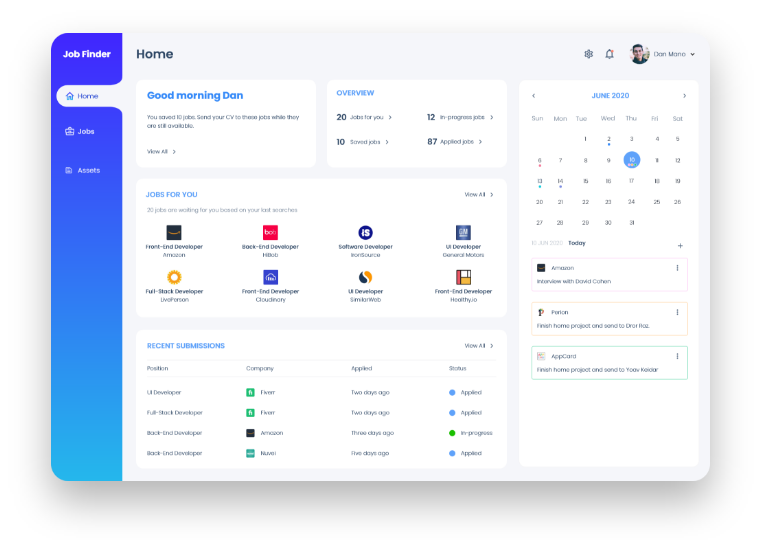
Job Finder is a web application for job seekers. The application helps the user to find the relevant jobs for him and provides him with an easy way to track his job applications.
The Challenge
Finding the right job from an endless number of job postings all around the net is time consuming and frustrating. Most job applications are rejected by an Applicant Tracking System (ATS) used by recruiters before they are even seen by the recruiter himself. Tracking the job search process is also very challenging for the job seeker, who usually applies for multiple jobs in parallel and may be in different stages of his recruitment process with the various companies.
The Solution
There are many applications that assist users throughout the job search process. However, each one of them is lacking some important functionality.
Job Finder has all these major functionalities in one place and thus, ease the job search process (see “competitive analysis” section below for a comparison).
Job Finder provides a sophisticated automated search tool. This tool searches for available jobs across various sources in the web and finds the jobs with the highest matching score to the applicant qualifications. Job Finder provides the user with an easy way to see which requirements are not fulfilled. This, allows the user to improve his CV (if possible) and his chances to be interviewed.
Job Finder also helps the user to track his job search process and status of activities.
The Process
Discover
Define
Ideate
Prototype
Test
Competitive Analysis
A few of Job Finder main competitors are Huntr, Job Scan and Linkedin.
Below is a table that depicts the availability of some of the important functionalities across these web applications.
| Job Finder | Huntr | Job Scan | ||
|---|---|---|---|---|
| Collects jobs from across the web | ||||
| Manages tasks (i.e. activity tracking) | ||||
| Manages contacts | ||||
| Manages multiple resume versions | ||||
| Applicant Tracking System score |
User Research
The main audience for the Job Finder application is job seekers from the high-tech industry at the ages of 25-65.
Based on a questionnaire that was filled by the target users, I discovered the following characteristics of the job seekers:
- 48% use four to six job boards or company sites.
- 75% save jobs they find online with the intent to apply to them later.
- 75% adjust their resume and cover letter before applying for a job.
- 80% say it’s hard to track their job search efforts.
- 55% say it is hard to find a position which fully matches their skills.
Talking with HR recruiters I discovered why job seekers are not getting the jobs they want:
- Job seekers are not differentiating themselves from others.
- Job seekers fail to successfully transfer past experience to the current job opportunity.
- Job seekers appear to be over or under qualified for the job.
- Job seekers don’t make a proper research of the company they are about to be interviewed in.
Persona
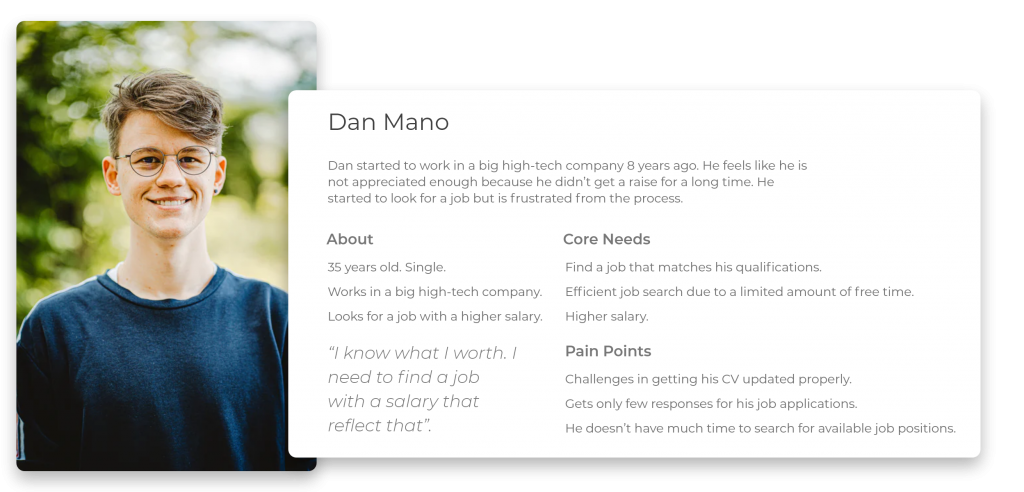
Based on the above findings, I created the following “Persona”.
Finding the Problem
I created “How Might We” (HMW) and “Point of View” (POV) statements, using insights from my research and Persona, to define the challenges that need to be addressed in the ideation sessions.
| Insight | Need | POV Statement | HMW |
|---|---|---|---|
| It is time consuming to search and find relevant jobs that best match the user skills. | Find the best relevant jobs efficiently. | As a user, I need to find the best jobs that match my skills easily and in a short time, so I can use my time efficiently to apply for the rights positions. | How might we get the user to know about best relevant jobs for him? |
| CV and cover letter are often modified based on the specific job description. | Maintain several CV and cover letter versions. | As a user, I need a tool that allows me to maintain a few versions of my CV and cover letter, so I will be able to use the appropriate version when applying for a job. | How might we help the user to manage a few versions of his CV and cover letter? |
| It is hard to track the status of each position during the job search process. | Track the activities of each job the user applied to. | As a user, I need a tool that helps me to maintain the status and activities of each job I applied to, so I can manage my activities efficiently and prepare myself for the following step in the job process. | How might we help the user to track the status and activities of each job he applied to? |
| It is important to include in the resume and the CV most of the qualifications that are needed and requested in the job description that the user possesses. | Identify if some qualifications are missing from the resume before applying for a job. | As a user, I would like to identify the job qualifications that are requested and aren’t mentioned in the CV, so that in case I own them I can add them to the CV and cover letter. | How might we help the user to identify qualifications that are missing from his CV and cover letter for a certain job? |
Solving the Problem
How might we get the user to know about best relevant jobs for him?
Job Finder collects all relevant jobs from across the internet and displays them to the user:
- All relevant jobs are displayed in a single board.
- Jobs which are a better match are shown at the top.
- A user is able to narrow down the job list by applying filters.
How might we help the user to manage a few versions of his CV and cover letter?
Job Finder allows the user to maintain a list of CV and cover letter in the repository:
- Job Finder displays information for each version, including: creation time, description and number of times it was sent.
How might we help the user to track the status and activities of each job he applied to?
Job Finder helps to organize the job search process activities.
- Displays all applied jobs in a list.
- Provides the status of each job the user applied to, including: timelines, activities, notes and contacts.
How might we help the user to identify qualifications that are missing from his CV and cover letter for a certain job?
Job Finder enables the user to identify what qualifications are needed for a certain job that aren’t mentioned in the CV
- A “matching score” is calculated and displayed based on job description, CV and cover letter.
- A visual representation shows the user what qualifications are needed and missing from his CV. Thus, the user may add these qualifications in case he owns them.
- Job Finder suggests the best CV and cover letter to be used for a certain job from the available versions in the repository.
User Flow
The following user flow describes the various interactions a user may have with the Job Finder application (click the image to enlarge).

Wireframes
After a few hand drawn sketches, I switched to Adobe XD to create a prototype.
Below are a few wireframes from the on-boarding process.
The on-boarding wizard is shown when using Job Finder for the first time, allowing the user to create a CV and a cover letter in an easy and friendly way.

User Interface Design
The main design principles used are simplicity and modernity. I keep a calm design to avoid of any distractions in order to maximize the user’s focus while job searching. A palette of blues is also served to calm the user and keep him focused.
Home
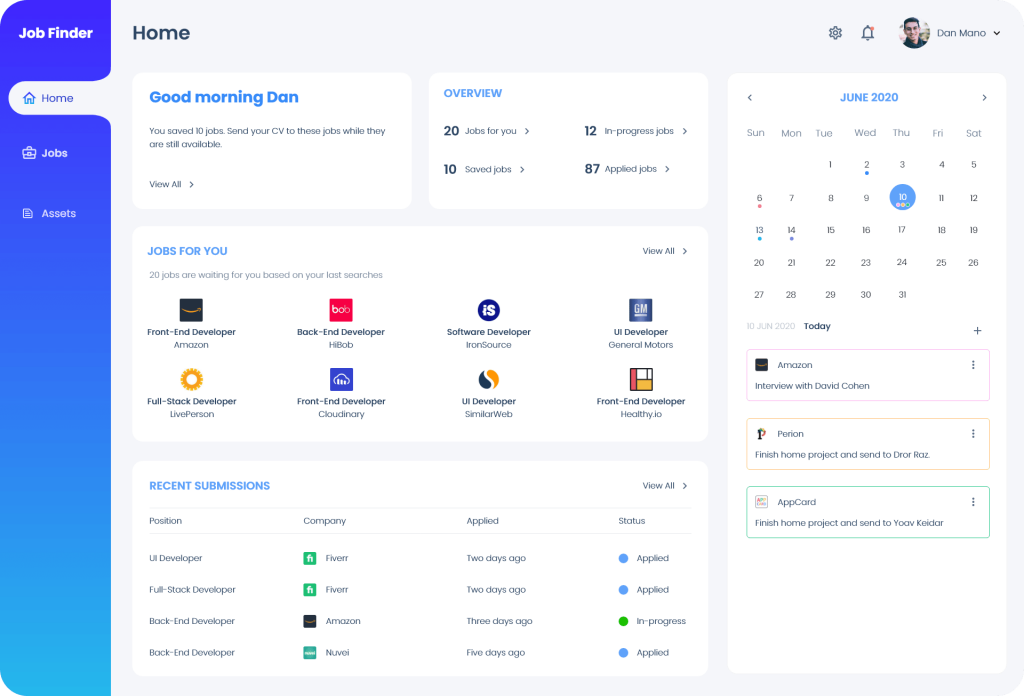
The “Home” screen is the main screen of the Job Finder application. This screen is dedicated to the following actions:
- Allowing the user to apply to “best matching” job positions the tool finds.
- Reminding the user to apply to his saved jobs.
- Providing a status summary of the job search process.
- Displaying the status of the positions the user recently applied to.
- Displaying the calendar and list of tasks.
- Providing an easy navigation to the other screens of the application.
Jobs
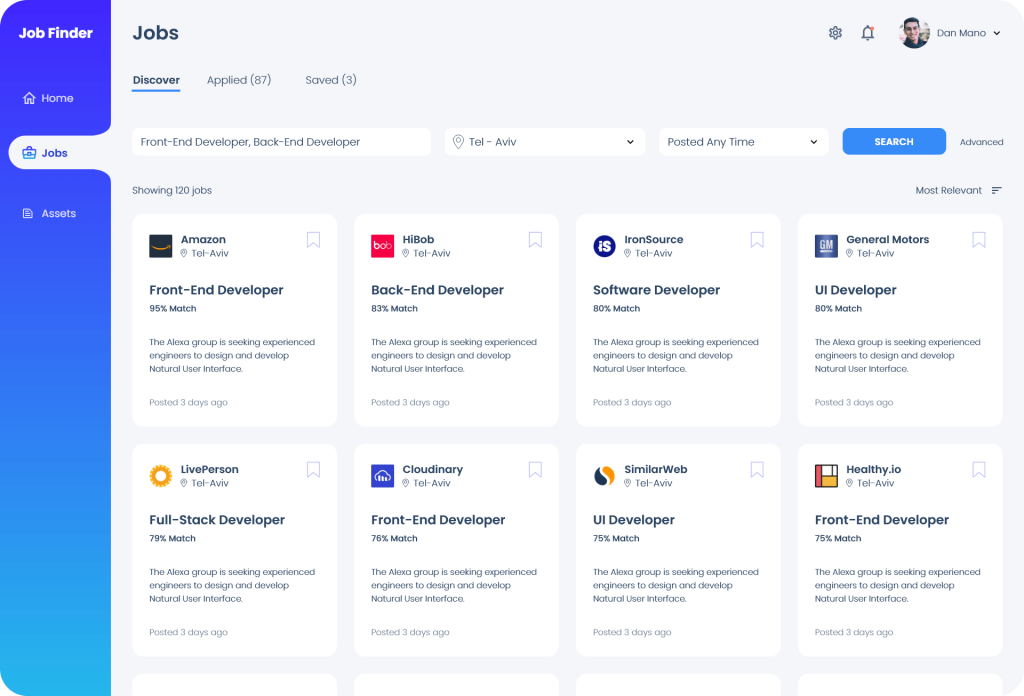
There are three job boards:
- Discover
- Applied
- Saved
Discover Jobs
“Discover Jobs” screen contains the best relevant job positions that the application could found for the user across the net: job boards, HR websites, companies’ websites and social media.
Clicking on a specific job opens the “Single Job” screen.
Single Job
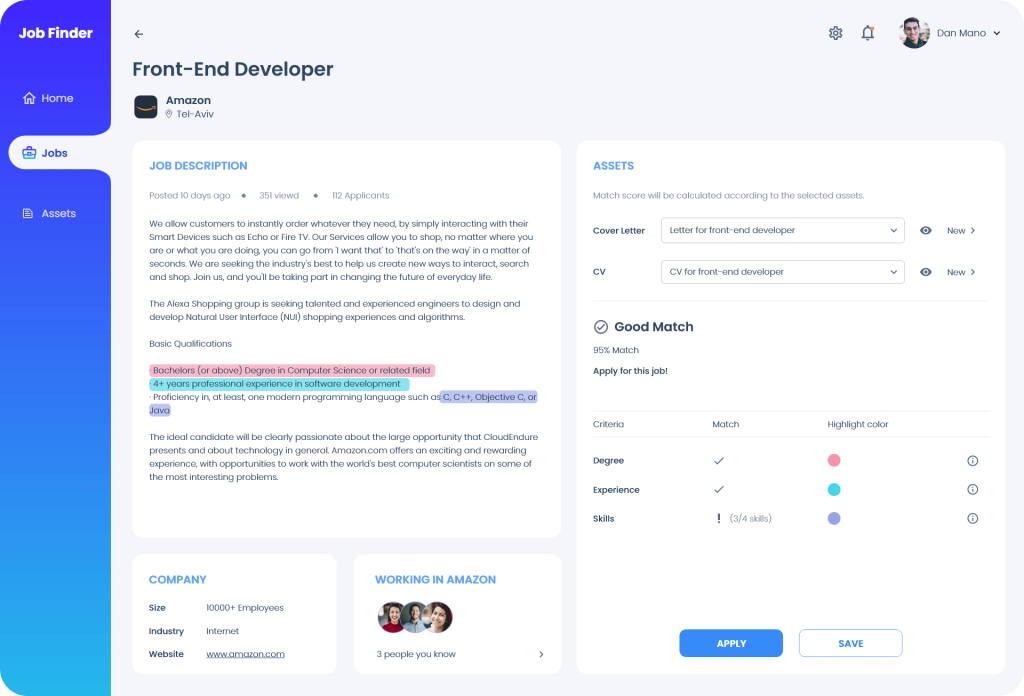
The “Single Job” screen provides the information related to the selected job and allows the user to apply for this position.
It includes the following:
- Job criteria.
- A list of people the user knows who work for the company.
- Allows the user to select or create a CV and a cover letter.
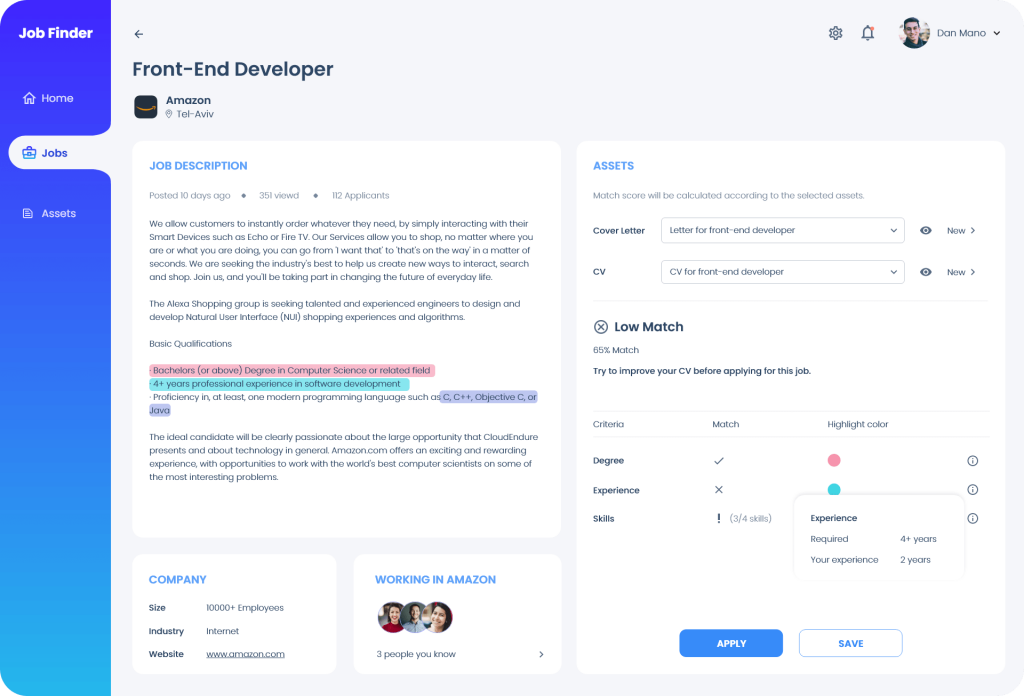
- Displays the “Matching Score” for the position (according to the selected CV and cover letter).
The “Matching Score” section includes a table that contains the following information:
- Job criteria
- Match icon:
– Fully match
– No match
– Partial match - Highlight color – the color in which the requirement is highlighted in the job criterion.
- Info icon – hovering over the “Info icon” displays additional information about this job criterion.
- Apply button – encourages the user to apply for the job.
- Save button – allows the user to save the job information and apply to it later.
Job screen with high matching score
Job screen with low matching score
Applied Jobs
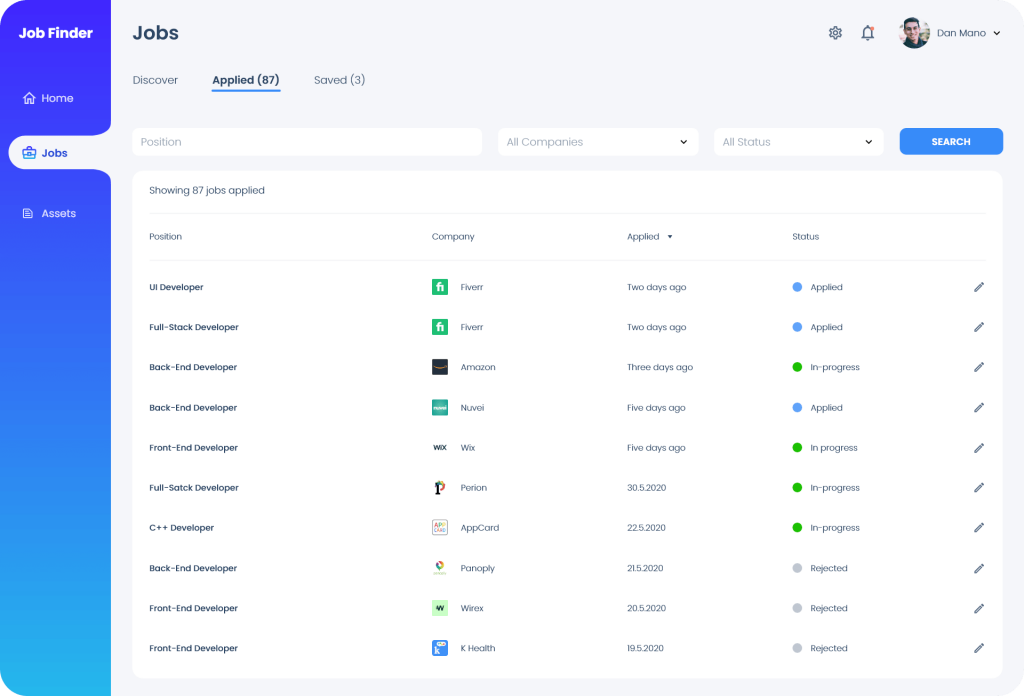
The “Applied Jobs” screen displays all applied jobs and their status.
The status may be one of the following:
- Applied – job application was submitted but no response was received yet.
- In-progress – user is in an active process with the company.
- Rejected – application was declined.
- Not applicable – Job is no longer available.
Clicking on the edit icon opens the “Applied Job” screen.
Single Applied Job
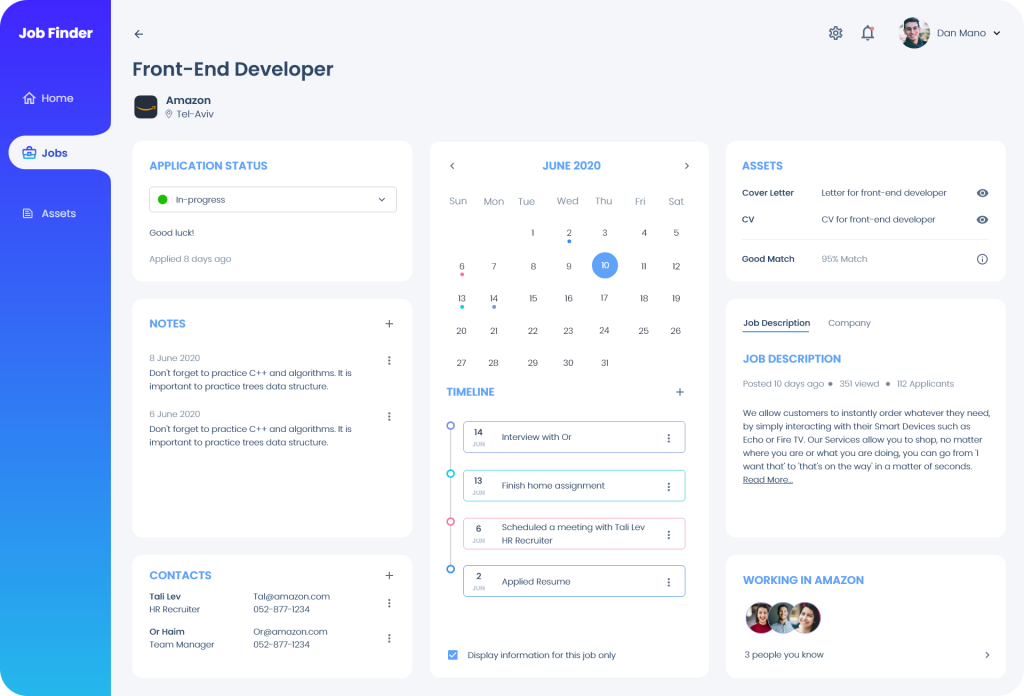
The “Applied Job” screen displays relevant information about a specific job the user applied to.
User may view and edit this information:
- Application status (i.e. applied, in-progress, rejected).
- Notes and contacts – add, delete and edit relevant notes and contacts.
- Calendar and timeline – view and manage the job activity.
- Assets – view the CV and cover letter which were sent.
- Job description and company.
- Get contact information about people the user knows and who work for this company.
In case a job is not applicable, the option “Not Applicable” is automatically selected in the “Application Status”.
Saved Jobs
The “Saved Jobs” contains all job positions that the user saved.
The visual display of this screen is similar to the one in the “Applied Jobs” screen.
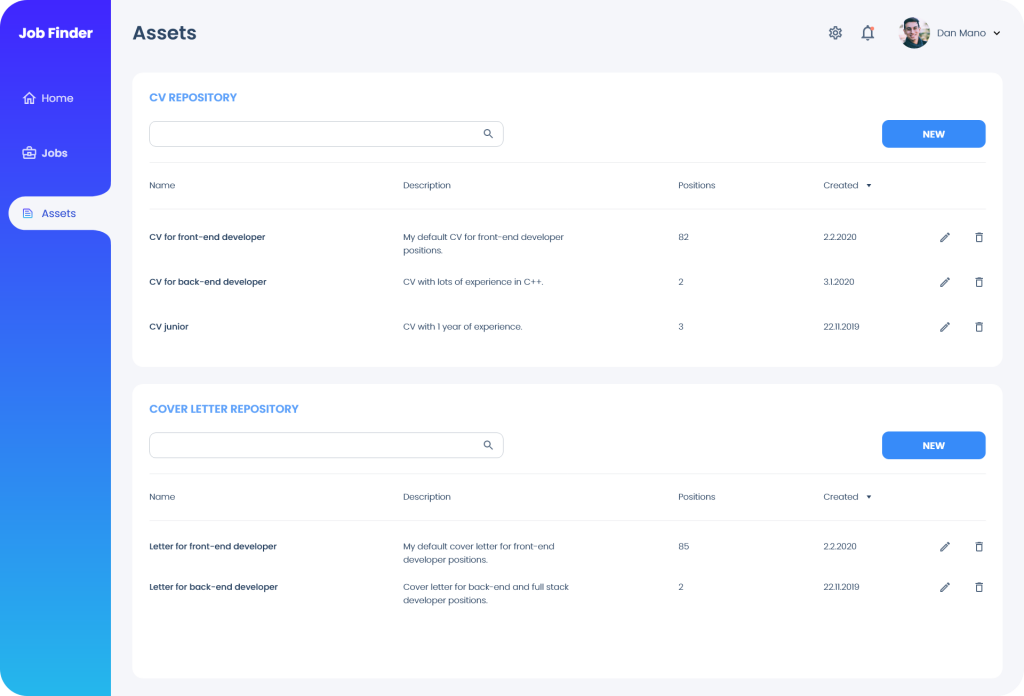
Assets
The “Assets” screen allows the user to manage CV and cover letter repositories. User can search, add, edit and delete his “assets”.
Clicking the “New” button provides the user with the option to create a new asset by:
- Uploading a file
- Opening the CV or cover letter wizard
Measuring Success
In order to measure Job Finder success, I will track the following metrics:
- Number of registrations: the number of users registered to the application.
- “Matching score” effectiveness: examine whether most of the positions that became “in-progress” have high “matching score” (i.e. recruiters got back to the applicant)
- Under the assumption that a new job search takes at least a couple of months, check how many registered customers used the application at least for 8 weeks after their registration date.